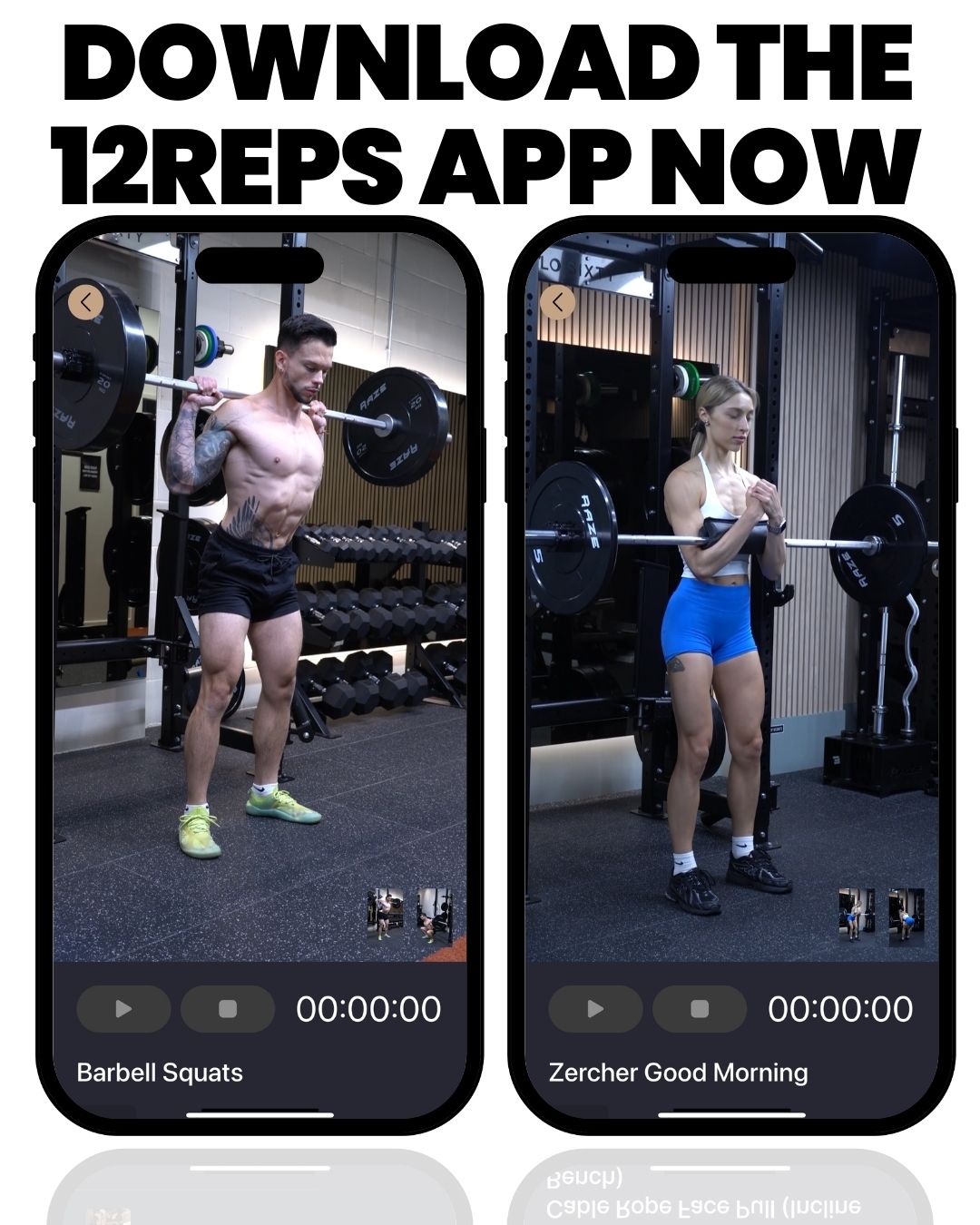


A strength training app is useful when it removes the guesswork from three things: what to do, how to do each exercise, and whether you are progressing. 12REPS does this with a plan built around your goal, equipment and time, trainer demonstrations for every exercise and a log of every set you lift.
As a personal trainer, I know how confusing workouts can be. Many people walk into the gym and wonder, “What should I do today?” Many people have a gym membership but no plan. They repeat the same few machines, or they stop going because they feel lost.
This article explains what a strength training app should do for you, how 12REPS handles each part, who it suits and how to get started.

What should a strength training app do?
A good app should cover the same basics a coach would:
- A plan: sessions that match your goal, the equipment you have and the time you can spare.
- Technique guidance: clear demonstrations so you know how each exercise should look.
- Tracking: a record of your sets, reps and weights, so you can lift a little more over time.
- Accountability: something that helps you keep turning up week after week.
These match what the research says matters. The World Health Organization recommends muscle-strengthening activities on 2 or more days a week. The American College of Sports Medicine (ACSM) says resistance training needs to progress over time to keep producing results.
1. A plan built around you
12REPS builds your training around your goal, your equipment and the time you have. When you open the app, your workout is ready. For example, it might be a Chest and Back session lasting 60 minutes with six exercises.
If you want to choose the focus yourself, use the body map. Pick the muscle, the equipment and how long you have, and 12REPS builds the session. You can save it and train.
Video: 12REPS app, strength training for gym and home. Watch this for a quick look at how the app sets out a session, wherever you train.
2. Trainer demonstrations for every exercise
Knowing what to do is only half the job. You also need to know how to do it. 12REPS includes exercise demonstrations and technique breakdowns from real, qualified personal trainers.
When you start a workout, you can watch the demo before each exercise. That is especially helpful for lifts you have not tried before. You can also browse our free exercise library on the website.
3. Tracking that gives you a number to beat
Progressive overload means gradually increasing the demand on your muscles, for example by adding weight or reps. The ACSM position stand suggests a 2 to 10% load increase once you can do one or two reps beyond your target. To do that, you need to know what you lifted last time.
In 12REPS, you enter the reps and weight for each set as you go. The app remembers what you lifted, so next time you have a number to beat. Our beginner’s guide to progressive overload explains how to use those numbers.
Tracking also helps you stick with it. A meta-regression of healthy eating and physical activity programs found that programs using self-monitoring alongside related techniques, such as goal setting, were more effective. For more on logging, read how to track your workouts.

4. Accountability that keeps you training
Knowing what to do is one thing. Turning up week after week is often harder. 12REPS includes several features to help you stay consistent:
- Tracking of your workouts, sets, reps, weights and streaks
- A weekly goal
- Challenges and awards
- A community of other members
Body progress and photos
Strength is not the only thing you might want to track. You can log your body weight and see the trend, with your start, current and change. You can also take before, mid and final progress photos, store them privately and compare stages.
Home or gym?
Because your plan is built around the equipment you have, 12REPS works in a full gym or with a smaller setup. Tell the app what you have, and your sessions use it.
Video: Dumbbell upper-body workout with the 12REPS app. Watch this to see a full session built around one piece of equipment.
Who is 12REPS for?
12REPS suits you if:
- You have a gym membership but are not sure what to do in each session.
- You are new to strength training and want to see how each exercise is done. If the weights area feels daunting, read how to feel confident in the gym.
- You want to know what you lifted last time without keeping a notebook.
- You are short on time and want a session that fits. See how to build muscle without spending hours in the gym.
It is not a replacement for medical care. If you have an injury, a health condition or are returning after surgery, get advice from your doctor or physical therapist first. If you want hands-on, in-person coaching, a personal trainer is still the best option.
How to get started
- Download 12REPS from the App Store or Google Play.
- Set your goal, your equipment and how much time you have.
- Open the app, tap Start Workout and watch the demo for your first exercise.
- Enter your reps and weight for each set.
- Next session, try to beat the numbers you logged.
Prefer to start with a written plan? Browse our free workout plans.
Train with confidence
If you want a trainer-led plan in your pocket, see how 12REPS works or download the app. You get a session built around your goal, a trainer demonstration for every exercise and a number to beat each time you train.

Sources
- American College of Sports Medicine position stand. Progression models in resistance training for healthy adults. American College of Sports Medicine. Medicine and Science in Sports and Exercise, 2009. https://pubmed.ncbi.nlm.nih.gov/19204579/
- Effective techniques in healthy eating and physical activity interventions: a meta-regression. Michie S, Abraham C, Whittington C, McAteer J, Gupta S. Health Psychology, 2009. https://pubmed.ncbi.nlm.nih.gov/19916637/
- Physical activity. World Health Organization, accessed 2026. https://who.int/initiatives/behealthy/physical-activity